
Swagger 接口文档

📄 swagger 接口文档 _ PIGCLOUD

商业版
生态🔥
快速上手
前端部分
功能使用
- 📄 基础工具类库使用
- 📄 系统多租户使用
- 📄 swagger 接口文档
- 📄 knife4j 接口文档
- 📄 微信公众号模块使用
- 📄 本地文件系统使用
- 📄 minio 文件系统使用
- 📄 七牛文件系统使用
- 📄 阿里云文件系统使用
- 📄 腾讯云文件系统使用
- 📄 华为云文件系统使用
- 📄 支付宝支付使用
- 📄 微信支付使用
- 📄 聚合支付使用 👍
- 📄 系统按钮权限使用
- 📄 系统数据权限使用
- 📄 系统参数使用指南
- 📄 数据脱敏使用
- 📄 敏感词过滤使用
- 📄 系统缓存使用
- 📄 登录用户在线控制
- 📄 登录用户注册
- 📄 登录失败账号锁定
- 📄 登录强制重置密码
- 📄 钉钉、企微数据同步
- 📄 小程序登录接入使用
- 📄 社交登录使用
- 📄 CAS 登录使用
- 📄 企业微信登录使用
- 📄 钉钉登录使用
- 📄 网关限流功能使用
- 📄 quartz 定时任务使用
- 📄 报表设计 jimu 模块使用
- 📄 Flowable 协同办公模块使用
- 📄 大屏设计模块使用
- 📄 common-seata 分布式事务使用
- Sentinel 控制台使用
- 📄 common-xss 安全过滤使用
- 📄 common-gray 灰度路由使用
- 📄 common-idempotent 幂等使用
- 📄 common-excel 模块使用
- 📄 common-job 分布式任务使用
- 📄 common-datasource 多数据源使用
- 📄 common-websocket 模块使用
- 📄 common-sse 模块使用
- 📄 encrypt-api 接口加解密使用
- 📄 common-audit 字段审计使用
- 📄 sequence 分布式发号器使用
- 📄 sas 接口单元测试
- 📄 代码生成功能使用
- 📄 代码生成模板自定义
后端部分
扩展必看
生产部署
社区分享
更新日志
📄 swagger 接口文档
pigcloud
重要说明
- 本章文档对应视频 📺 6.接口文档 swagger 使用
- 单体版本请求地址: http://pigx-gateway:9999/admin/swagger-ui.html
- ==请求入口必须是
pigx-gateway:9999这种形式, 而不是 ip:9999 ,不然跨域。==
# 接入调试
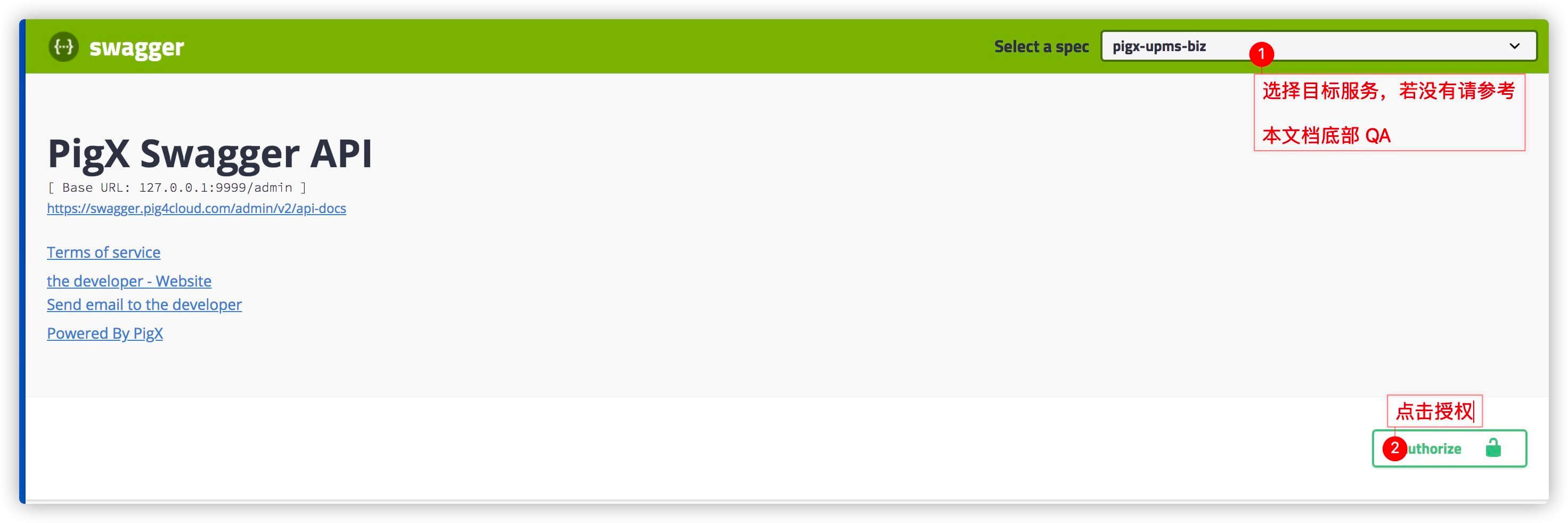
# 1. 访问 swagger-ui 页面
- 访问
http://pigx-gateway:9999/swagger-ui.html打开 swagger 页面。
# 2.模拟登陆
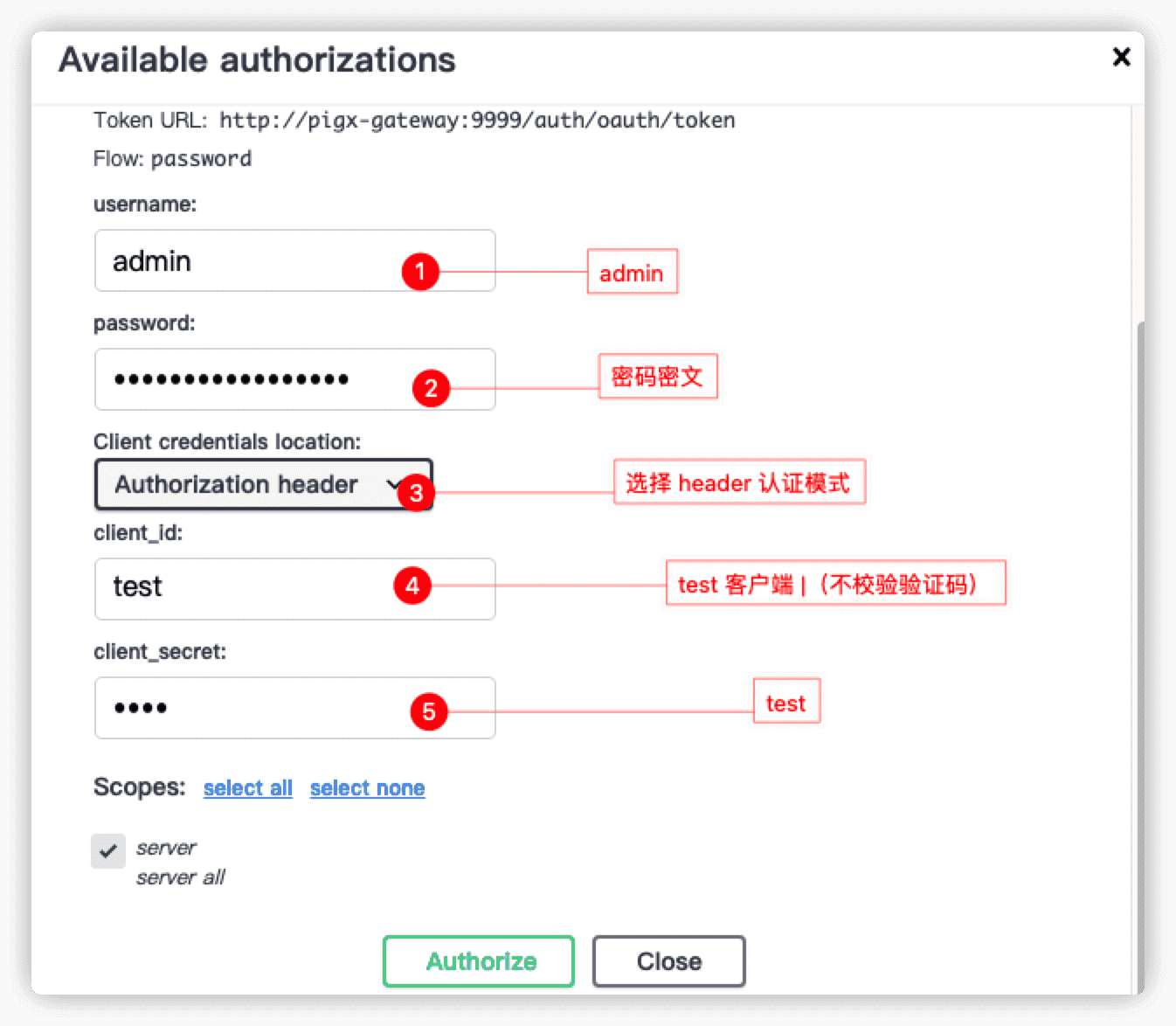
# 3.填写客户端信息
1 | username: admin |
# 新服务接入
# 1.服务添加依赖
1 | <dependency> |
# 2.目标服务开启 OpenApi
- 在应用主类中增加==
@EnableOpenApi==注解 并且填写当前应用的网关请求前缀
1 |
|
# 3. 接口增加@SecurityRequirement
Controller 接口上边必须增加 @SecurityRequirement(name = HttpHeaders.AUTHORIZATION)
1 |
|
# 4. 重启网关服务 (微服务版本)
如果使用 pigx 微服务版本,需要在上述操作完成后 ==重启 pigx-gateway 服务==,以重新加载 Swagger 服务列表。
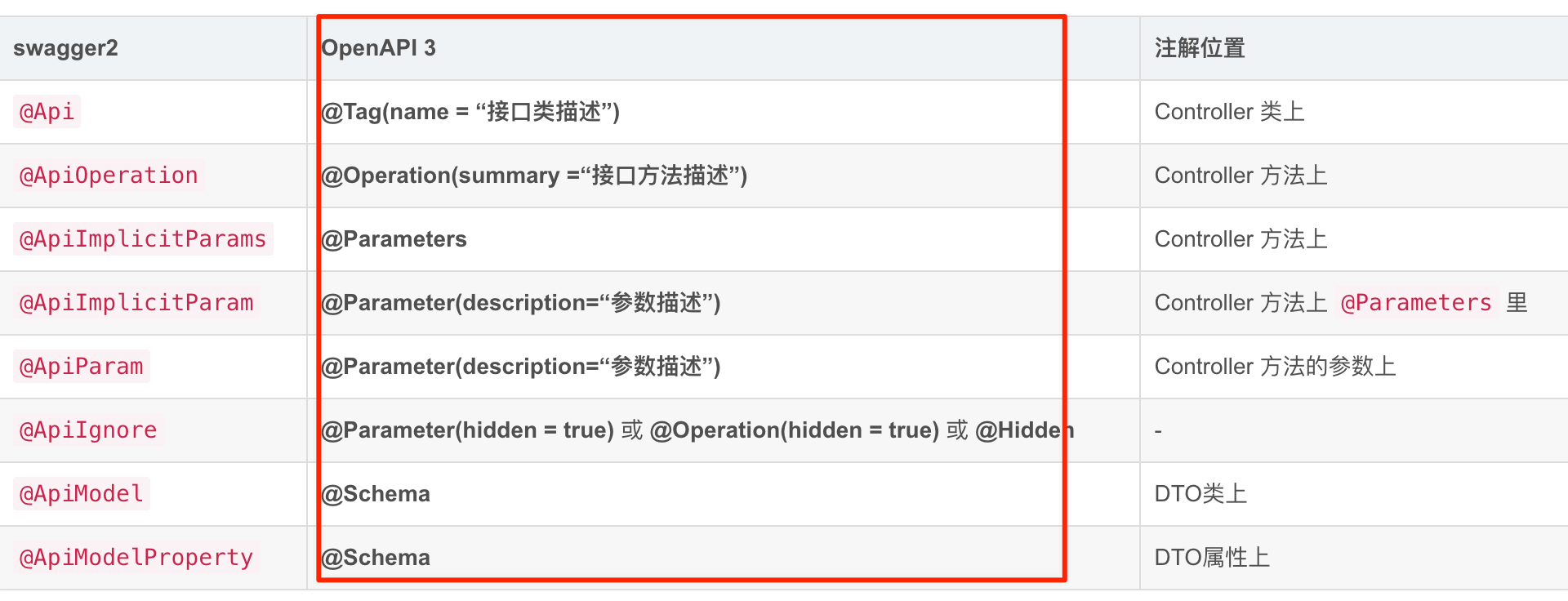
# 5.常用注解
详细注解可以参考:https://blog.csdn.net/weixin_44768189/article/details/115055784 (opens new window)
# 关闭 swagger 接口文档
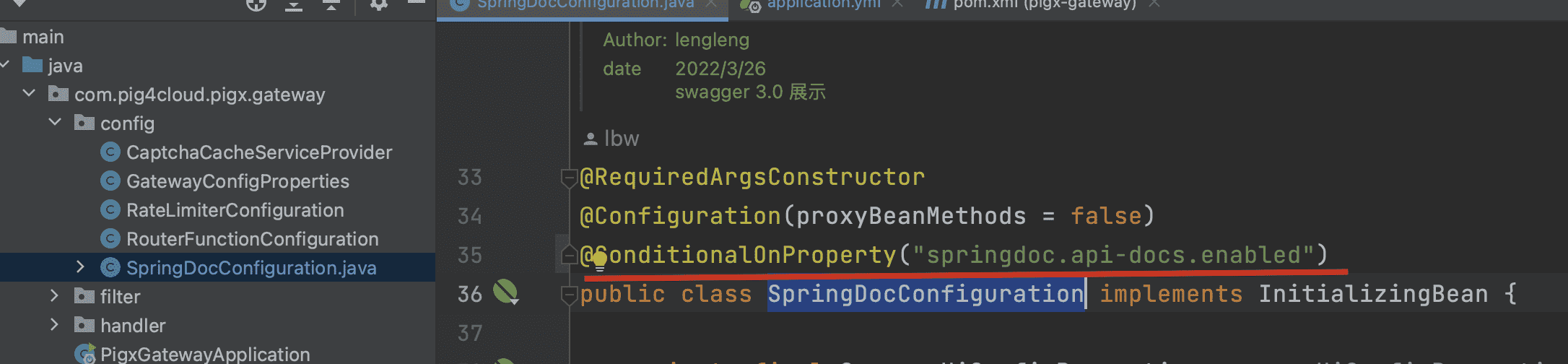
- nacos/application-dev.yml 配置关闭属性
1 | springdoc: |
- SpringDocConfiguration 增加关闭配置
- 接入调试
- 1. 访问 swagger-ui 页面
- 2.模拟登陆
- 3.填写客户端信息
- 新服务接入
- 1.服务添加依赖
- 2.目标服务开启 OpenApi
- 3. 接口增加@SecurityRequirement
- 4. 重启网关服务 (微服务版本)
- 5.常用注解
- 关闭 swagger 接口文档
内容勘误反馈

- 标题: Swagger 接口文档
- 作者: PIGCLOUD
- 创建于 : 2024-01-01 00:00:00
- 更新于 : 2025-09-22 14:27:28
- 链接: https://anime-blog.52lin.site/📄 swagger 接口文档 _ PIGCLOUD/
- 版权声明: 本文章采用 CC BY-NC-SA 4.0 进行许可。